The Wonderful Wijers
10.6 km
You start at Domein Kiewit and walk towards Bokrijk through the Land of 1001 Ponds. After Bokrijk Castle, you walk throu... read more
© Stadia Maps © OpenStreetMap contributors, © NodeMapp
Put on your hiking shoes and discover the most beautiful hiking routes in Rooierheide (Diepenbeek)! You will also see all places where hiking nodes are currently available.
Below you will find the latest hiking trails in Rooierheide (Diepenbeek) offered by official tourism organisations or by verified users of our platform.
Pathfinders are hikers who share their hiking adventures in Rooierheide (Diepenbeek) with you.
Looking for an adventure? Try our 'Surprise Me' feature! Enter your preferences below, and we will suggest a number of hikes using the hiking nodes in Rooierheide (Diepenbeek). The routes are calculated in real-time using the hiking node network.
10.6 km
You start at Domein Kiewit and walk towards Bokrijk through the Land of 1001 Ponds. After Bokrijk Castle, you walk throu... read more
7.4 km
Walked on 1/26/2026 Parking: Patersplein Rooierheide. Distance walked according to GPS: 7.51 km. Signage: Walking juncti... read more
6.9 km
Parking: Sports Hall Kneippstraat Genk. Signage: Walking app/GPS. The walk covers the first 2.3 km on paved roads, follo... read more
7.2 km
Parking: Sports hall "De Kneipp" parking, Kneippstraat Genk. Distance walked according to GPS: 7.26 km. Signage: Junctio... read more
7.6 km
Parking: Kneippstraat Genk (football field Bokrijk Sport) Signage: Walking app/Nodes. Leisurely walk to Provincial Domai... read more
7.5 km
Parking: Sporthal Diepenbeek, Stationsstraat 27. Signage: GPS/hiking app. Alternating well-accessible forest paths and p... read more
7 km 2.5/5
Parking: Lutselusplein, Lutselus (Diepenbeek) Signage: Nodes/GPS/Walking app. First 4 km over low-traffic streets and ro... read more
9.1 km
Parking: Science Park in Diepenbeek Signage: Junction points The walk always goes over paved paths or roads. Rest benche... read more
9.6 km
Parking: Lutselusplein, Lutselus (Diepenbeek) Signage: Junctions/GPS/Hiking App. After leaving the busy Nieuwstraat behi... read more
8.2 km
Parking: Along the side of the road in Zavelvennestraat (Hasselt) or Bokrijkseweg (Zonhoven). Signage: Junctions/GPS/Wal... read more
7.2 km
Walked on 26/02/2026 Parking: Campus Ter Heide, Klotstraat 125 Genk Distance walked according to GPS: 7.04 km. Signage: ... read more
8 km
Parking: Kauwbosstraat Zonhoven. Signage: Nodes. Beautiful walk in the new node network “De Wijers”. The first 700 m are... read more
8.7 km
Parking: Kauwbosstraat Zonhoven Signage: Junction points. From the parking lot, head towards Bokrijk until reaching "Fie... read more
6.7 km
Parking: At the corner of Hasseltweg and Drijtap. Walk away from the N75, the first number is at the intersection. Signp... read more
5.8 km 3.5/5
This is an awe-inspiring walk. You start from the small parking lot near a picnic area, located at the edge of the Kievi... read more
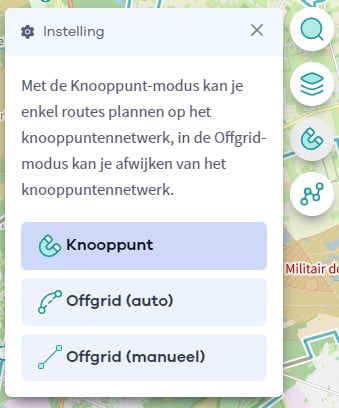
The Route Planner Pro has changed a bit on our new website. The ability to plan routes that deviate from the hiking network is now integrated into our node planner (continue reading below image):
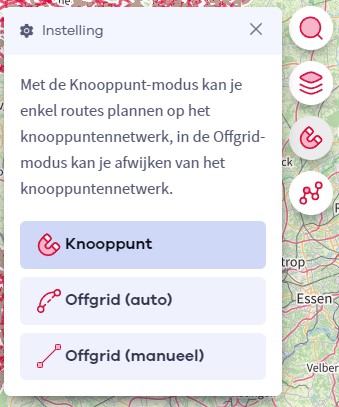
If you open our route planner, you can press the magnet symbol in the upper right corner. If you then choose Offgrid (auto) (automatic route planning) or Offgrid (manual) (connecting places manually), you can select places on the map and plan a route that deviates (partially or completely) from the hiking network.
You can switch between Node and Offgrid mode to create a route that runs partly along nodes and partly away from the node network.

The Route Planner Pro has changed a bit on our new website. The ability to plan routes that deviate from the bicycle network is now integrated into our node planner (read more below image):

If you surf to our route planner, you can press the magnet symbol in the upper right corner. If you then choose Offgrid (auto) (automatic route planning) or Offgrid (manual) (connecting places manually), you can select places on the map and plan a route that deviates (partially or completely) from the biking network.
You can switch between Node and Offgrid mode to create a route that runs partly along nodes and partly away from the node network.

Are you sure you want to log out?
With this QR-code or text code you can login to our app. Open the login screen of the NodeMapp Hike app or NodeMapp Bike app and press the button with the QR-code. In the same screen, you can also enter the text code (case sensitive!) if you prefer.
Time remaining to log in with this code:
01:00