Jan Theunis
Beringen, Belgium
Hiking in Korspel
9.2 km
Parking: Crown Street Korspel (parking lot at the church) Signposting: Junctions. The route is well signposted but somew... read more
© Stadia Maps © OpenStreetMap contributors, © NodeMapp
Put on your hiking shoes and discover the most beautiful hiking routes in Stal (Beringen)! You will also see all places where hiking nodes are currently available.
Pathfinders are hikers who share their hiking adventures in Stal (Beringen) with you.
Looking for an adventure? Try our 'Surprise Me' feature! Enter your preferences below, and we will suggest a number of hikes using the hiking nodes in Stal (Beringen). The routes are calculated in real-time using the hiking node network.
9.2 km
Parking: Crown Street Korspel (parking lot at the church) Signposting: Junctions. The route is well signposted but somew... read more
6.8 km
Parking: BE-Mine Beringen. Either park in the large parking lot at the shopping center or at the TODI diving center park... read more
7.2 km 1.5/5
Parking: Beringen Station Koerselsesteenweg. Signage: GPS/Walking App. Surprisingly beautiful walk through the woods in ... read more
5.7 km
Parking: BE-Mine, in the large parking lot at the shopping center. Signage: Blue diamond Walking through the cité of Ber... read more
8.4 km
We did this walk on 03/04/2025. We combined two local routes. This is a walk with a very high 'must-do' factor. During t... read more
7.6 km
Parking: Parking football field KVK Beringen, Hasseltsesteenweg 130 Signage: NodeMapp app / GPS. This walk mainly goes t... read more
7.4 km
Walked on 23/1/2026 Parking: Schansvijverstraat 57, Beverlo. Distance walked according to GPS: 7.24 km. Signposting: GPS... read more
10.1 km 5/5
We did this walk on 11/20/2025 (13,364 steps). This loop takes you through the Valley of the Great Creek, often better k... read more
7.7 km
Parking: Merkenlaan Leopoldsburg. Signage: NodeMapp app/GPS. Walking through the Royal Park and the Nieuwpark. In some p... read more
8.1 km
Parking: Parking athletics stadium De Veen Heusden-Zolder (via the Dijkstraat). Signage: Walking app/GPS You walk toward... read more
7.6 km 5/5
Parking: Sint Baaf Sports Hall, Padbroekstraat 3, Eversel (Heusden-Zolder). Signage: NodeMapp app / GPS. Walk through th... read more
10.1 km
Hiked on 4/7/2026 Parking: Community Center, Heidestraat in Heppen Hiked distance according to GPS: 10 km Signage: GPS/H... read more
7.5 km 4/5
Parking: Heppen Soccer Field, Heidestraat. Signage: GPS/Hiking App. Quiet walk in the Gerheser Forests. The first kilome... read more
10 km
Walked on 11/1/2026 Parking: Community center, Heidestraat 65 in Heppen. Walked distance according to GPS: 9.74 km. Sign... read more
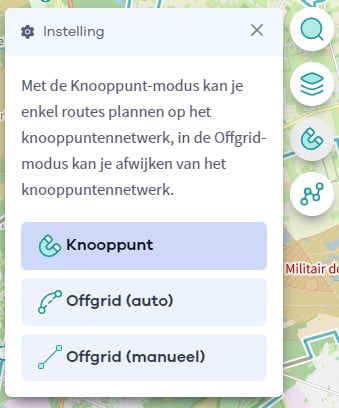
The Route Planner Pro has changed a bit on our new website. The ability to plan routes that deviate from the hiking network is now integrated into our node planner (continue reading below image):
If you open our route planner, you can press the magnet symbol in the upper right corner. If you then choose Offgrid (auto) (automatic route planning) or Offgrid (manual) (connecting places manually), you can select places on the map and plan a route that deviates (partially or completely) from the hiking network.
You can switch between Node and Offgrid mode to create a route that runs partly along nodes and partly away from the node network.

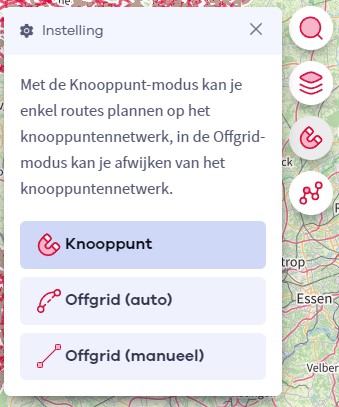
The Route Planner Pro has changed a bit on our new website. The ability to plan routes that deviate from the bicycle network is now integrated into our node planner (read more below image):

If you surf to our route planner, you can press the magnet symbol in the upper right corner. If you then choose Offgrid (auto) (automatic route planning) or Offgrid (manual) (connecting places manually), you can select places on the map and plan a route that deviates (partially or completely) from the biking network.
You can switch between Node and Offgrid mode to create a route that runs partly along nodes and partly away from the node network.

Are you sure you want to log out?
With this QR-code or text code you can login to our app. Open the login screen of the NodeMapp Hike app or NodeMapp Bike app and press the button with the QR-code. In the same screen, you can also enter the text code (case sensitive!) if you prefer.
Time remaining to log in with this code:
01:00